fotorie
Calories by photo: how the app that scans your food works
Show your dish and Fotorie tells you what\'s in it, how much each item weighs, and its total calories and macros. Here we explain how it does it, its margin of error, and how to get the most out of it.
How it works internally
Scanning food with your phone sounds like magic, but it\'s not: it\'s three steps that take a few seconds.
- The photo travels encrypted from your phone to Fotorie\'s server, in the European Union. It is not saved in any public gallery or shared with third parties.
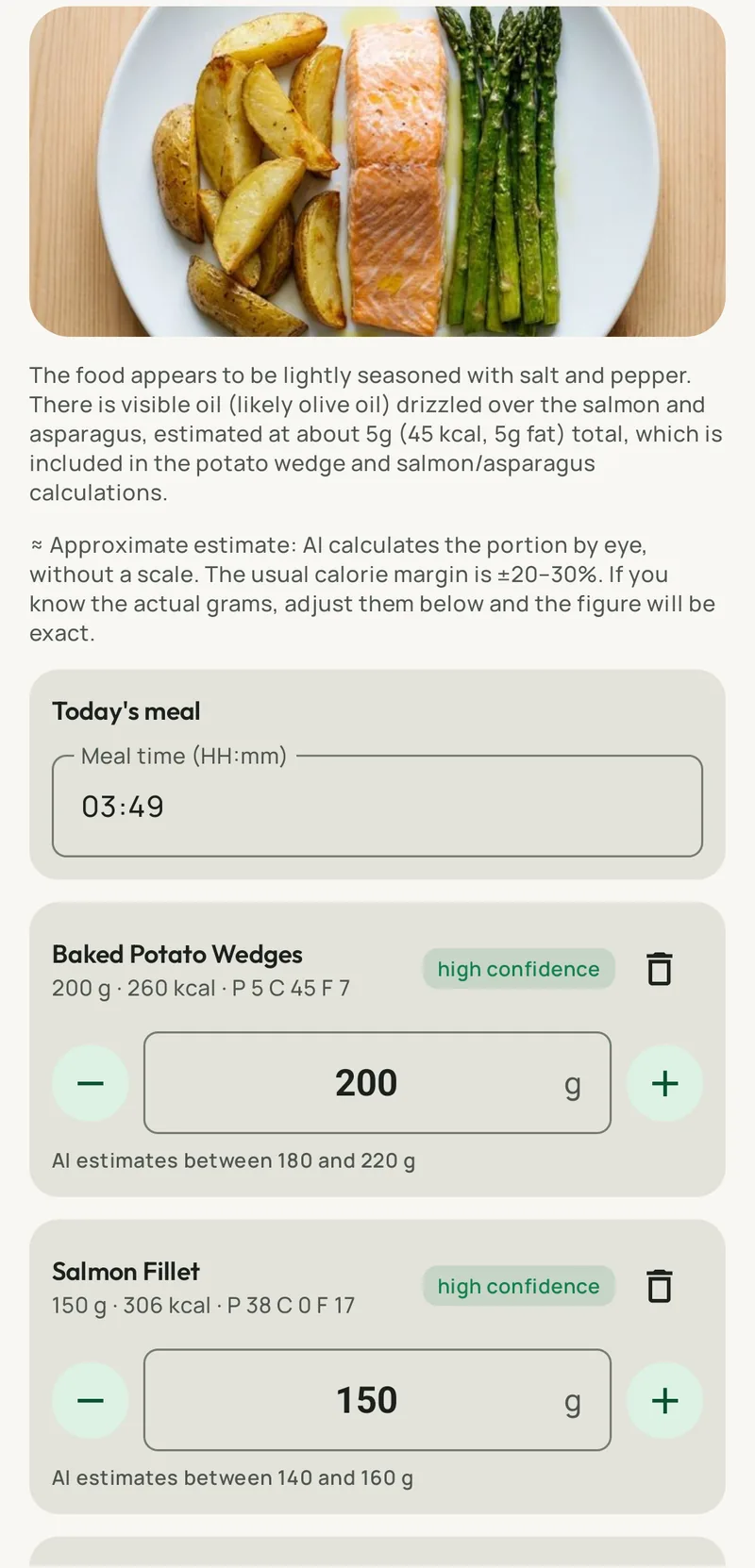
- An artificial intelligence model looks at the dish as an experienced nutritionist would: it identifies each food (chicken breast, white rice, broccoli, oil), estimates the portion of each based on the plate size and what is visible, and searches for its composition in food tables. It returns calories, proteins, carbohydrates, and fats per food and in total, with a confidence level for each line.
- You have the final say. If the app saw 150 g of rice and you know it was 200, you change it with a tap and the figure recalculates. If something is missing (bread, a glass of wine), you add it by text. And if you don\'t want to touch anything, the record is made as is.
That record enters your day like any other: it deducts from your calorie plan, adds to your macros, and the coach takes it into account when you ask what to have for dinner.
What accuracy you can expect
Here we need to be honest, because there are apps that promise accuracy, and no one has it. Counting calories with a photo is an estimation, just like noting "a plate of lentils" in any other app. The difference is that here the estimation is made by a model that sees the dish, not your memory at eleven at night.
| Dish type | How it performs | What to do |
|---|---|---|
| "Normal" dish (protein + side dish + vegetable) | Well. Foods are seen separately and portions are estimated with little margin. | Nothing, or adjust grams if you know them. |
| Salads, sandwiches, breakfasts | Good for visible items; dressing and sauces are estimated by default. | Add by text if you\'ve added a lot of oil or sauce. |
| Stews, casseroles, mixed rice dishes | Fair: the whole is seen, not each ingredient. The app indicates this with less confidence. | Review the portion or describe the recipe to the coach. |
| Fried foods, battered foods, filled pastries | What is not visible is underestimated (absorbed oil, filling). | Adjust upwards or use the barcode if packaged. |
| Packaged foods with label | Accurate with the barcode. | Scan the code and enter the quantity. |
In the app, each food has a confidence warning, and the total figure is presented as what it is, an estimation. For the important goal, which is knowing if you\'re at 1,600 or 2,400 kcal for the day, that accuracy is more than enough. For a specific day where you want exactness, weigh and adjust. We explain it more calmly in calorie counter.
How to take a good photo
The model sees what you show it. Four habits that improve the result more than any technical adjustment:
- Light. Natural light or dining room light is sufficient; avoid flash, which flattens the dish and alters colors.
- The whole plate. Make sure the edge of the plate is visible: it serves as a size reference for estimating grams.
- From above, with some angle. A top-down photo shows what\'s there; a slight tilt (about 30 degrees) shows how much is there. The ideal is between the two.
- One dish per photo. If there\'s a first course, main course, and dessert, three photos. If sharing a table, frame only your plate.
Take the photo before you start eating. With a half-eaten plate, the model estimates what\'s left, not what was there.
When another method is better
The photo is the fast way, not the only one. There are times when another option works better:
- Packages: the barcode is exact and doesn\'t use up a photo.
- What you already had on the menu: a tap on "I\'ve eaten it" and it\'s recorded with its real recipe calories.
- What you\'ve already eaten: tell the coach by text or with a voice note ("I had a banana and yogurt for a snack") and they\'ll record it.
- Homemade recipes you repeat: the first time you describe it with its ingredients; then it\'s saved in your meals and you reuse it.
On the free plan, you get two photos a day; other methods have no limit. If you want more photos, the Essential (6 a day) and Plus (20 a day) plans extend them; see plans.
Photo privacy
A photo of your food says a lot about you, and we treat it as such. It travels encrypted, is processed on servers in the European Union (Google Cloud, Belgium), and is not used to train models, sold, or shared. Your data (records, weight, photos, health) is on your phone and in an encrypted copy linked to your verified email, and you can delete it all from your Profile whenever you want. Fotorie is made by Vitasane, a nutrition center based in Seville, with the privacy policy published on this website.
If you want to see it with your own dishes, download Fotorie for Android or iPhone; the free plan doesn\'t require a card.
Frequently asked questions
How accurate is calorie counting with a photo?
It's an estimation with a margin, like any record that doesn't weigh the food. For recognizable dishes (protein, side dish, and visible vegetables), it usually comes close to what tables would give with the weighed portion; for mixed stews, sauces, and fried foods, the margin is larger. The app shows the confidence level for each food and lets you adjust the grams with a tap.
Does it work with all types of food?
It works with most homemade and restaurant dishes: salads, meats, fish, pasta, rice, legumes, sandwiches, breakfasts, desserts. Where it performs less well is with what's not visible: the oil in the pan, the sugar in a sauce, or the filling of an empanada. In these cases, it's advisable to adjust or complete by text.
How many photos can I take per day?
Two per day on the free plan, 6 with Essential, and 20 with Plus and Family. Text, barcode, and menu logging have no limit.
What happens to my photos?
They travel encrypted to Fotorie's server in the European Union, are analyzed, and are not used to train models or shared. You can delete your data from your Profile whenever you want.
Can it scan a barcode on a package?
Yes. For packaged products, the barcode provides the exact figure from the label, and it only asks you for the quantity you've eaten.
Download Fotorie for free
Two photos a day for free, no ads, with weekly menu and AI nutrition coach. For Android and iPhone.